

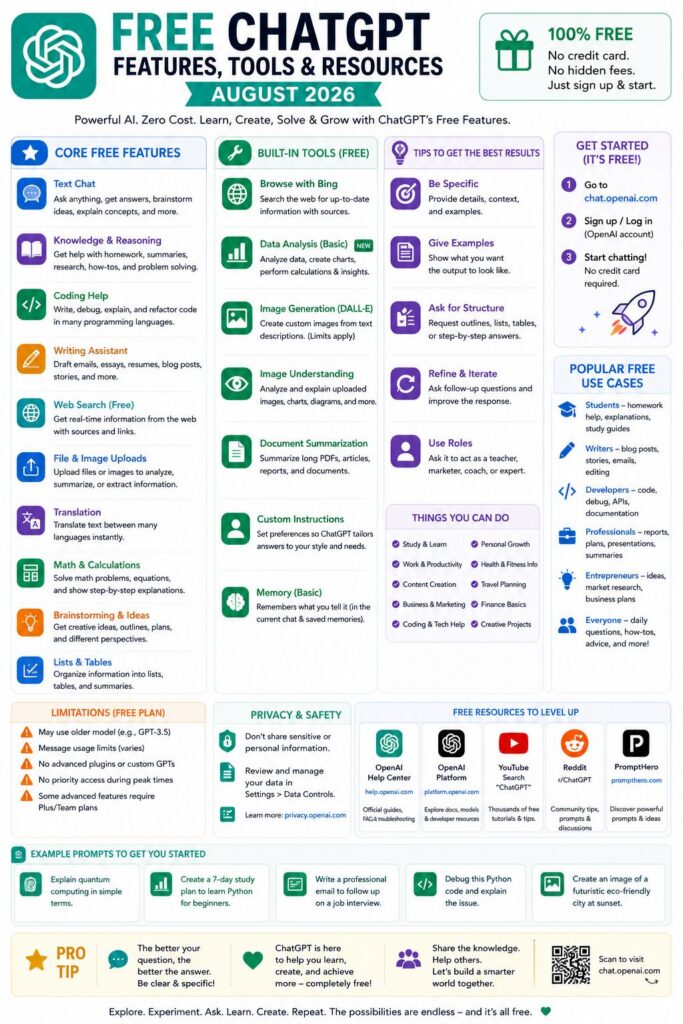
Quick Look: Free ChatGPT Tools in August 2026
- Unlimited text chats are now free — OpenAI removed the message cap for Free and Go accounts starting August 10, 2026.
- GPT-5.6 Luna is the new default model for free users, which replaces the older model and includes a new Think button for more challenging questions.
- Voice, images, and Deep Research are still only available for paid plans — but the gap between free and paid has significantly decreased this year.
- Free users now see ads inside ChatGPT responses — a compromise OpenAI made along with the unlimited chat upgrade.
- There’s a new developer tool called Sign In With ChatGPT that’s already integrating with platforms like GitLab and Supabase — and it’s more important than most people realize.
The free version of ChatGPT in August 2026 looks completely different from what it was a year ago — and most people haven’t realized what’s actually available now.
OpenAI is constantly increasing what free users can do, from limitless text chats to a more intelligent default model and a fresh reasoning tool. If you’ve been thinking the free tier is just a basic demo, it’s time to think again. To stay on top of all the latest changes as they happen, following a trustworthy AI news and tools resource can be a game changer when features change from week to week.
Free and Go Accounts Now Have Unlimited Text Chats — Here’s What You Need to Know
As of the week of August 10, 2026, OpenAI has eliminated the text message limit for Free and Go accounts. This means you can now engage in unlimited text conversations with ChatGPT without worrying about a daily limit or being asked to upgrade.
The Real Reason OpenAI Lifted the Text Chat Limit for Free Users
It’s not just because they felt like it. OpenAI started showing ads on the free plan at about the same time — a simple trade-off: free users get unlimited text, and OpenAI makes money off that usage with ads. It’s the same business model that search engines and email services have been using for years, now being used for AI.
This move also shows a competitive thrust. Given that Google Gemini, Anthropic’s Claude, and Meta AI are all offering strong free tiers, OpenAI had to meet or surpass the baseline. The removal of the message cap is one of the most obvious indications yet that AI text generation has become a commodity, and the real monetization battle is now in premium features, enterprise contracts, and API access.
- Free and Go users get unlimited text chats starting August 10, 2026
- Abuse guardrails are still in place — automated or spam-like usage can trigger restrictions
- The change applies to ChatGPT only, not the OpenAI API
- Go plan users share this benefit alongside Free tier accounts
What “Unlimited” Actually Means (And What It Doesn’t)
Unlimited text chats means exactly that — text. You can send as many messages as you want in a conversation, start new chats freely, and never see a “you’ve reached your limit” message for standard text prompts. What it doesn’t mean is unlimited access to every feature inside ChatGPT.
Restrictions Still in Place: Images, File Uploads, and Advanced Tools
Despite the freedom of unlimited text, free users will still encounter restrictions when it comes to more expensive features. Image generation, file uploads for analysis, Deep Research, and advanced voice mode are all either metered or completely behind a paywall depending on your plan.
Here’s a quick rundown of what is still restricted on the free plan as of August 2026:
|
Feature |
Access on Free Plan |
Access on Paid Plan |
|---|---|---|
|
Text Chats |
Unlimited |
Unlimited |
|
GPT-5.6 Luna (default) |
✓ Yes |
✓ Yes (Sol on Plus/Pro) |
|
Think Button |
Limited (abuse guardrails) |
Full slider control |
|
Image Generation |
Limited |
Higher limits |
|
File Uploads |
Limited |
Higher limits |
|
Deep Research |
✗ No |
✓ Yes |
|
Advanced Voice Mode |
Limited |
Full access |
|
Ads |
✓ Yes |
✗ No |
GPT-5.6 Luna Is Now the Standard Free Model
Official OpenAI Update (August 6, 2026): “GPT‑5.6 Luna will become the standard model for Free and Go users this week. Starting next week, they’ll also have unlimited text chats and access to a new Think button for harder questions (subject to abuse guardrails).”
There’s a significant improvement here. Free users are no longer operating on an outdated model — they’re now using GPT-5.6 Luna, which is a member of the same GPT-5.6 family that powers the paid tiers. The difference is not whether you’re on a modern model, but which version you have access to.
What Sets GPT-5.6 Luna Apart From the Last Free Model
GPT-5.6 Luna is designed for speed and everyday tasks — it’s quick, makes sense, and takes care of most writing, coding, research, and Q&A tasks with ease. The Sol variant, which is available to Plus and Pro subscribers, includes more dependable fact outputs, a sharper focus on intricate prompts, and an adjustable reasoning slider that allows you to control how much computational effort ChatGPT puts into a response. For those interested in broader applications, explore generative AI use cases that can enhance enterprise app development.
Introducing the Think Button: Its Functions and Applications
The Think button is essentially a single-tap deliberation mode. When you activate it on a particular message, ChatGPT spends more time pondering the issue before replying — handy for multi-stage maths, logic riddles, subtle writing, or anything where a quick response is likely to be a superficial one.
Free users have access to the Think button, but with certain restrictions to prevent misuse. This essentially means that you can use it for really tough questions, but you won’t be able to use it for every single message in a session without hitting some boundaries.
Comparing the Think Button and the GPT-5.6 Sol Slider on Plus and Pro
For Plus and Pro subscribers, the GPT-5.6 Sol model provides a full slider that you can adjust for each prompt, not just a simple on/off switch. This level of control remains a paid feature. The Think button on the free version is binary, offering only on or off options, with usage caps applied in the background.
Free ChatGPT Voice Features Available Now
Throughout 2026, the voice features in ChatGPT have been greatly improved. Free users can access a basic voice mode where they can talk to ChatGPT and get spoken responses. However, the complete Advanced Voice Mode, which includes real-time interruption, emotional tone recognition, and desktop file analysis, is only available for paid tiers. For more details, you can check the ChatGPT release notes.
Starting from August 7, 2026, ChatGPT Voice has introduced the feature of file uploads and Projects for users on supported plans. This will enable file analysis and project-based voice conversations. However, this feature has not been rolled out for free users. Hence, the voice on the free plan will continue to be more of a standard text-to-speech/speech-to-text interface rather than a real conversational AI layer.
Free Users Get More Voice Access in the February 2026 Update
OpenAI made a big move in 2026 when it decided to give free users access to basic real-time voice conversation, a feature that was previously only available to Plus and Pro users. This was a game-changer for free users as they could now have actual conversations instead of just dictating text. The desktop app was updated in July 2026 to make the experience even better, but the ability to upload files in voice sessions is still a paid feature.
Who Can Use Voice in Work and Codex?
As of August 2026, the Voice in Work mode and Codex integration are still premium features. This means that if you use ChatGPT for coding workflows, especially those that are Codex-based, you’ll need at least a Plus subscription to use voice input in these environments. The reason is simple: these sessions require a lot of computing power, and OpenAI hasn’t made this level of resource access available to free accounts yet. For developers exploring machine learning, it’s worth considering the best machine learning frameworks to optimize your coding workflows further.
However, the difference is becoming less pronounced. Basic voice is free for general conversation, which includes a wide variety of applications — from thinking aloud to dictating drafts. If you’re not doing intensive coding sessions or file-based voice analysis, the free voice level is genuinely helpful in August 2026.
Free Plan Image Generation
Image generation on the free plan is still available, but it is limited. Free users can still generate images through ChatGPT, but their monthly allowance is less than paid tiers. As of July 23, 2026, ChatGPT Images is available on Free, Go, Plus, Edu, and Pro plans, with Business and Enterprise support still rolling out. This means free users are included, but they will reach their limits faster than subscribers.
While free users can view images that are generated within ChatGPT’s web responses, such as when discussing visual topics or using certain browsing-enabled prompts, the full suite of ChatGPT Images, which includes editing, style control, and higher generation limits, is only available to paid users. For those interested in exploring more about the advancements in AI, check out the latest AI news and updates.
Free ChatGPT Now Includes Inline Web Images
Free users in 2026 have a new, underrated feature to look forward to: inline images that appear directly in ChatGPT responses when relevant. If you ask a question that would benefit from a visual, such as a product comparison, a diagram reference, or an image from the web, ChatGPT can now provide that inline without requiring you to leave the conversation. This works on the free plan and is a significant improvement over the text-only responses that free users were limited to in previous versions.
Free Accounts Model that Triggers Image Responses
Free accounts can generate image-capable responses with GPT-5.6 Luna, which is the current default free model. Luna can trigger the image layer when it deems a visual would enhance the response or when you specifically ask for an image. But remember, free users have usage limits that reset over time, so if you generate a lot of images, you’ll eventually hit a cap or be nudged to upgrade.
Deep Research: A Comparison of Free and Paid Access
Deep Research is a feature that sets apart free and paid ChatGPT in 2026. It enables ChatGPT to carry out multi-step, independent research on the internet — compiling sources, tracing citations, and creating organized long-form research reports. It’s among the most impressive capabilities of ChatGPT, but it is not accessible on the free plan.
As a Plus subscriber, you get a certain number of Deep Research queries every month, and as a Pro user, you get a lot more. If you often need to gather research, review literature, or write sourced reports, this one feature is a compelling reason to upgrade. Free users can still ask ChatGPT to search the web and summarize information, but it’s not the same — it’s slower, not as deep, and not as organized as a real Deep Research session.
All Plan Tiers Now Have Desktop App Features
ChatGPT launched a major desktop app update in July 2026 that included improvements for all plan tiers, even the free ones. The update on July 14 introduced a universal search feature for chats, projects, images, and documents on the web, iOS, and Android. Now, even free users can search their entire conversation history without needing a paid account.
Switching Between Chat and Work, and Continuity Across Devices
One of the most useful updates to the desktop version is a clearer distinction between Chat mode and Work mode within the app. Chat is your typical conversational interface. Work mode is intended for extended sessions with documents, projects, and structured tasks. Free users have full access to Chat mode, while features in Work mode such as voice file analysis and project-based organization may be more limited depending on the specific tool involved, but the basic project structure is available across all plans.
ChatGPT Desktop App Now Available for macOS and Windows
As of mid-2026, the ChatGPT desktop app has been made available for both macOS and Windows. Here are the features that are currently available for free users on both platforms:
Here are some of the features, tools, and resources you can use for free:
- Search anything in your chats, projects, images, and documents
- Start a chat on your mobile and continue it on your desktop
- Use GPT-5.6 Luna as your default model on all platforms
- Use the Think button for more complex questions (subject to guardrails)
- Use basic voice input and output in Chat mode
- View images inline within responses
The desktop app also introduced custom instructions expansion in July 2026 — but that specific update (increasing the character limit to 5,000) was rolled out for Plus, Pro, Enterprise, Business, and Education users only. Free users retain access to custom instructions but at the previous character limit.
The desktop app on the free plan is more than sufficient for the average user. The restrictions you’ll encounter are in resource-intensive features like Deep Research and long voice sessions, not in the basic interface or conversation quality.
Important Information for Developers: Ads on the Free Plan
OpenAI introduced ads within ChatGPT for free users in 2026, along with the update that allowed unlimited text chats. If you’re in the process of creating workflows, demos, or internal tools using the free version of ChatGPT, you should be aware of this — ads are clearly marked and appear within the response interface.
Understanding Ad Display and Labeling in ChatGPT
ChatGPT displays ads within the chat interface, not as disruptive pop-ups or interstitials. Ads are clearly marked as sponsored content and are visually different from ChatGPT’s responses. OpenAI has made a conscious effort to ensure the labeling is clear, adhering to the same disclosure standards you’d find with search ads on platforms such as Google.
Ads might be a minor inconvenience for most users — you see them, you scroll past them, and the conversation goes on. However, for developers who use ChatGPT’s free interface as a demo environment or a tool for interacting with clients, it’s important to know that ads will appear for anyone using the free plan. If you’re demonstrating ChatGPT to stakeholders or incorporating it into a workflow walkthrough, an ad popping up in the middle of a session can spoil the experience.
OpenAI hasn’t shared the specifics of its ad targeting, but it seems to be based on frequency rather than popping up after every response. So if you’re a heavy user, you’re more likely to see ads than if you just drop in from time to time.
Ad-Free Plans
All of ChatGPT’s paid plans — Go, Plus, Pro, Business, Enterprise, and Education — no longer have ads as of August 2026. Ads are only present in the free tier, so you’ll immediately notice the lack of ads when you upgrade to any paid tier.
Introducing Sign In With ChatGPT: A Revolutionary Developer Integration Tool
Sign In With ChatGPT is a game-changing feature from OpenAI in 2026 that has largely flown under the radar. It operates in the same way as Sign In With Google or Sign In With Apple — users can log into third-party apps and services using their ChatGPT account, eliminating the need to create a new username and password. This feature allows developers to create apps that directly use ChatGPT’s authentication layer, simplifying the login process and leveraging OpenAI’s growing user base as a sign of trust.
- Works as a standard OAuth-based authentication flow
- Users authenticate with their existing ChatGPT account credentials
- Developers can integrate it the same way they’d add Google or Apple sign-in
- Available to developers building on OpenAI’s platform ecosystem
- Reduces onboarding drop-off by eliminating new account creation
What makes this more than just a convenience feature is the signal it sends about OpenAI’s platform ambitions. By positioning ChatGPT as an identity provider, OpenAI is moving from being a tool you use to being infrastructure you build on. That’s a meaningful shift — and it has compounding implications for how AI gets embedded into software workflows going forward.
ChatGPT’s Sign In feature is available to free users across all platforms that support it. This means that your free account can be used as a credential in a variety of integrated tools. Although a paid plan is not required to use this authentication method, the features you can use within these apps may vary depending on your plan level. For a comparison of AI services, you might want to check out this AI services comparison.
Which Platforms Are Already Compatible With Sign In With ChatGPT
GitLab and Supabase are two of the early platforms that have confirmed integration with Sign In With ChatGPT in 2026. These platforms are primarily used by developers — GitLab for version control and DevOps pipelines, and Supabase as an open-source alternative to Firebase for backend development. This early adoption indicates that OpenAI’s main target audience for this feature is developers, not the average consumer.
How This Streamlines Developer Workflows in Tools Like GitLab and Supabase
What this means is that Sign In With ChatGPT eliminates an authentication step when onboarding developer tools. If you’re already logged into ChatGPT — which most developers working with AI tools are — you can start a Supabase project or access GitLab resources without having to create a separate account. Combined with ChatGPT’s growing presence within coding workflows via Codex and the Work mode interface, this begins to establish a unified environment where your AI assistant and your development toolchain share the same identity layer. This type of integration minimizes context-switching and maintains momentum in technical workflows.
Is the Free ChatGPT Plan Sufficient for Developers in August 2026?
For developers who are doing light tasks such as prototyping concepts, writing boilerplate, debugging logic, and generating documentation, the free plan in August 2026 is genuinely capable. The GPT-5.6 Luna is competent at handling code, the Think button assists with more complex problems, and unlimited text chats mean you’re not rationing your inquiries. The universal search across chat history is also helpful when you’re trying to locate a snippet or a solution you worked on in a previous session.
For more serious development work, the free plan may not be enough. This is especially true for Deep Research, extended voice sessions with file analysis, and the compute-intensive tasks that benefit from GPT-5.6 Sol’s more reliable output and configurable reasoning depth. If you’re building production-level features, researching technical architectures, or using ChatGPT as a core part of your coding environment day-to-day, the Plus plan’s additional capabilities justify the cost. The free plan is an excellent starting point and a legitimate daily driver for many use cases — but it has a clear ceiling, and most active developers will eventually find it.
Common Queries
The 2026 free ChatGPT plan has seen so many changes that a lot of the information available online is no longer accurate. There are regular questions about message limits, model access, and feature availability — and the answers have changed several times in recent months. For the latest updates, you can refer to the ChatGPT release notes.
Here are the latest answers to the most frequently asked questions about free ChatGPT access, based on OpenAI’s confirmed rollout updates as of August 2026. If you’re relying on information from even a few months ago, some of these updates might catch you off guard.
As you delve into these details, remember that OpenAI has been rapidly upgrading ChatGPT all through 2026. What is accurate in August may not be by October. The most reliable way to stay up-to-date between major announcements is to either check OpenAI’s release notes directly or follow a trustworthy AI tracking resource.
Snapshot: Free Plan As Of August 2026
• Text chats: No limits (since August 10, 2026)
• Default model: GPT-5.6 Luna
• Think button: Included, with guardrails
• Deep Research: Not included
• Image generation: Limited access
• Voice mode: Basic access only
• Ads: Yes, clearly labeled
• Sign In With ChatGPT: Included
Do Free ChatGPT Users Get to Use GPT-5.6 in August 2026?
Yes, they do. Free users are now running on GPT-5.6 Luna, which became the default model for Free and Go accounts during the week of August 6, 2026. Luna is part of the GPT-5.6 family, so it’s a genuinely modern model, not a legacy fallback. The Sol variant, with its configurable reasoning slider and more reliable factual output, is still exclusive to Plus and Pro subscribers. But Luna can handle the vast majority of everyday tasks — writing, coding, summarizing, brainstorming — with no meaningful compromise.
Are There Any Limitations on the Free ChatGPT Plan After August 10, 2026?
As of August 10, 2026, text chat limits have been removed, but there are still rate limits for everything else. Image generation, file uploads, voice sessions, and Think button usage all still have caps under the free plan. OpenAI has also confirmed that there are abuse guardrails in place for unlimited text access, meaning that if you use automated or high-volume scripted usage, you can still be restricted. For normal human conversation patterns, you won’t run into any issues with text, but don’t expect every feature to be equally unlimited.
Is Deep Research Included in the Free Plan?
As of August 2026, Deep Research is not included in the free plan. This is one of the most noticeable differences between the free and paid plans.
ChatGPT’s Deep Research feature allows it to independently carry out extensive research on the web. This involves following trails of sources, summarizing the findings, and creating detailed reports with references. This is a completely different process from simply asking ChatGPT to search the web and summarize a topic, which is something that free users can still do through standard browsing-enabled prompts.
For those who need to perform deep research — whether it’s for academic research, competitive analysis, or technical due diligence — it’s a compelling reason to upgrade to Plus or Pro. The difference in quality and depth between a standard web search summary and a full deep research report is so substantial that most users who try it once find it hard to go back.
Does Every Response from Free ChatGPT Contain an Ad?
Not every response, but ads do appear frequently within the chat interface for free users. They are easily identifiable as sponsored content and are visually different from ChatGPT’s actual output. OpenAI hasn’t revealed the exact frequency logic, but placement seems to be based on usage rather than triggered per message — meaning that longer or more active sessions are more likely to see ads than occasional brief queries. All paid plans, starting with Go, completely remove ads.
Is ChatGPT Voice Available to Free Users on the Desktop App?
Yes, free users can use the basic voice mode in the ChatGPT desktop app. This means you can talk to ChatGPT and it will respond to you verbally in the standard Chat mode. This is useful for a variety of situations, whether you’re dictating messages or having a verbal discussion about a topic you’re working on.
Unfortunately, free users are not able to access the full Advanced Voice Mode experience. As of the August 7, 2026 update, ChatGPT Voice now has the ability to support file uploads and Projects — but this feature is only available to those with paid plans. Voice-based file analysis, project-based voice sessions, and voice within Work mode are all features that require a subscription. For the latest updates and insights, you can check out the AI industry news updates.
Regardless of whether you’re a macOS or Windows user, you can use the desktop app. It’s available to everyone, no matter what plan they’re on. The difference isn’t in the app itself, but in the voice features that are activated based on your account level. For most everyday users, the free voice experience is more than enough for daily chats.
As of August 2026, a paid plan is still needed if you want voice to interact with documents, run structured project sessions, or integrate with coding tools like Codex. This hasn’t changed, even with the other additions to the free tier this year.
If you want to stay updated on what’s free, what’s new, and how to maximize the use of today’s AI tools then please sign up. This resource is designed to help you sift through the noise and keep your AI skills on point.
You need to provide the content that needs to be rewritten.