

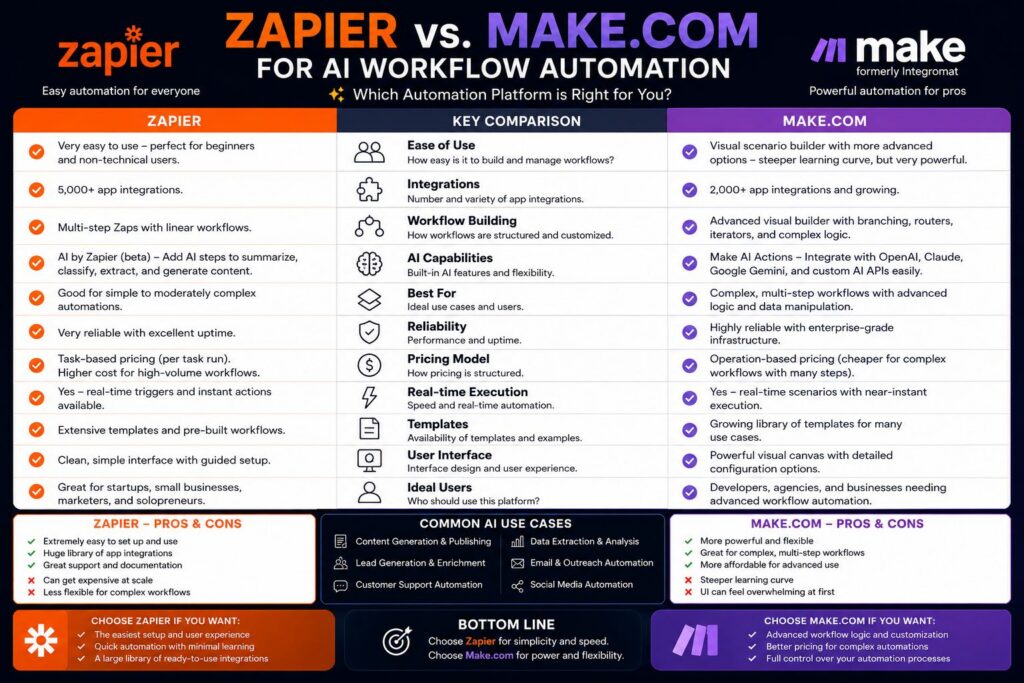
Choose the right automation tool for your business by comparing Make.com and Zapier.
- Make.com offers a visual, drag-and-drop canvas for building complex workflows, while Zapier uses a simpler linear step-by-step format that’s easier for beginners to pick up immediately.
- Zapier connects to 8,000+ apps compared to Make.com’s 3,000+, but Make.com offers deeper customization and conditional logic that Zapier simply can’t match at scale.
- Pricing works completely differently — Zapier charges per task, which adds up fast on multi-step workflows, while Make.com uses an operations-based credit model that’s significantly more cost-efficient for complex automations.
- Make.com is the better pick for technical users who need branching logic, data transformations, and real-time debugging, while Zapier remains the fastest way to get a simple automation running in minutes.
- You can actually run both platforms together — many teams use Zapier for quick, lightweight tasks and Make.com for the heavy-lifting workflows that need precision.
Make.com vs Zapier: What You Need to Know
Choosing the wrong automation platform could mean outgrowing it in six months or spending weeks learning a tool that was overkill from the start.
Make.com and Zapier both aim to solve the same basic issue: connecting applications and automating repetitive tasks without the need for coding. However, the way they tackle this issue is very different, and that difference can be significant depending on your specific needs. Make.com, previously known as Integromat, is built around a visual scenario builder that allows you to map out complex, multi-path workflows on a single canvas. Zapier, on the other hand, is designed for speed and simplicity, allowing you to connect a trigger to one or more actions in a simple linear sequence. The choice between them isn’t about which one is objectively better, but rather about which one best suits your work style.
If you’re a professional or a team that’s looking to build smarter, more scalable workflows, understanding the technical differences between these two platforms is key. This comparison breaks down all the major factors you need to consider — interface, features, pricing, AI capabilities, and scalability — so you can make a confident, informed decision.
What Separates Make.com from Zapier?
The primary difference between these two platforms isn’t cost or the number of apps — it’s their guiding principles. Zapier is designed with user-friendliness in mind. Make.com is designed for robustness.
Zapier Operates With a Simple, Straightforward Workflow Structure
Zapier organizes its automations, which are referred to as “Zaps”, in a linear fashion: one trigger leads to a series of actions that follow one after the other. Every step is taken in sequence, and the workflow proceeds from the beginning to the end without any deviation. This structure is easy to understand and great for beginners, but it can be restrictive when your automation needs to make choices, loop through data sets, or manage errors smoothly in the middle of the workflow. For simple use cases like “when a form is submitted, send a Slack message and add a row to Google Sheets,” Zapier is perfect.
Make.com Has a Visual Scenario Builder That Lets You Drag and Drop
Make.com has a feature called the Scenario Builder that shows your entire automation as a visual map that’s all connected. You’ll see individual steps — which Make.com calls modules — connected by lines on a canvas. You can create branches, add routers, set up filters, and make loops, all in one view. This makes it a lot easier to create and troubleshoot complex workflows because you can see the whole logic structure at once. If your automations involve conditional routing, gathering data, or transformations that have multiple steps, Make.com’s canvas approach is much more clear and easy to manage.
Which Interface Is Right For You?
If you’re new to automation, Zapier’s step-by-step setup will have you up and running with a working Zap in less than ten minutes. Make.com is a bit more challenging to learn — its canvas can seem intimidating at first, but most users say they get the hang of it after a few hours of practice. The choice is simple: Zapier gets you going quicker, but Make.com grows with you as your workflows become more complex.
Side-by-Side Feature Comparison
| Feature | Make.com | Zapier |
|---|---|---|
| Workflow Builder | Visual canvas (drag-and-drop) | Linear step-by-step |
| App Integrations | 3,000+ | 8,000+ |
| Conditional Logic | Advanced (routers, filters, loops) | Basic (Paths add-on required) |
| AI Features | Built-in AI agents and tools | AI by Zapier (limited) |
| Free Plan | 1,000 ops/month | 100 tasks/month |
| Real-Time Debugging | Yes, with detailed execution logs | Limited |
| Pricing Model | Operations (credits) | Tasks per action |
| Best For | Complex, high-volume workflows | Simple, quick automations |
Workflow Logic and Conditional Branching
Make.com has a clear advantage when it comes to workflow logic. Its built-in Router module lets you create multiple branches within a single scenario, each with its own filter conditions. You can set up a workflow that takes completely different paths depending on the data it receives — for example, routing a customer inquiry to different teams based on issue type, priority level, and account status all at once. Zapier does offer a “Paths” feature for conditional branching, but it’s only available on paid plans and is notably more limited in how many conditions and branches you can create compared to Make.com’s native Router.
Number of App Integrations: 3,000+ vs 8,000+
When it comes to the raw count of app integrations, Zapier takes the lead with over 8,000 integrations, while Make.com trails behind with 3,000+ integrations. However, this difference may not matter to most users because both platforms offer integrations with all major tools, including Google Workspace, Slack, HubSpot, Salesforce, Shopify, Airtable, Notion, and hundreds more. The larger library of Zapier becomes relevant when it comes to niche or newer apps that have not yet built a Make.com integration. However, Make.com supports custom HTTP requests and webhooks, which means you can connect to virtually any app with an API, even if a native integration does not exist yet.
Native AI Features on Both Platforms
Make.com has made a significant investment in native AI capabilities, incorporating AI agents into its scenario builder. These agents can perform tasks independently, such as browsing the internet, processing documents, making data-driven decisions, and initiating actions without human intervention. Make.com also integrates seamlessly with OpenAI, Anthropic, and other major language model providers, enabling you to create AI-driven workflows that can transform, categorize, or produce content as part of a broader automation chain.
Zapier’s AI feature, known as “AI by Zapier,” lets users include AI steps in their Zaps for tasks such as summarizing text or creating responses. Although it works, it’s more of an extra feature than a main function. For teams that want to create truly smart, self-sufficient workflows, Make.com’s AI framework is significantly more advanced and deeply embedded into the platform’s basic structure.
Immediate Testing and Debugging Tools
Make.com offers comprehensive execution logs for each scenario run, detailing the exact data that passed through each module, where mistakes happened, and what the system returned at every stage. You can test individual modules separately, examine raw data bundles, and replay failed executions without having to reconstruct the workflow from the beginning. Zapier’s debugging tools are simpler — you can see task history and error messages, but the level of detail is limited compared to Make.com’s execution inspector, which makes diagnosing complex workflows considerably quicker on Make.com.
Costs: The Pricing Structures of Make.com and Zapier
Cost is a significant factor in the comparison between these two platforms and is often misunderstood. The way each platform calculates and charges for automation activity directly affects your monthly bill, particularly as your workflows become more complex and increase in volume. For a broader perspective on business automation solutions, you can explore how different tools compare in features and pricing.
Zapier’s pricing model is based on tasks, where each action in a workflow is considered a single task. So, if you have a Zap with five steps that runs 1,000 times in a month, that’s 5,000 tasks. This is easy to comprehend, but it can get expensive fast if you’re running complex automations at a high volume. Zapier’s free plan only includes 100 tasks per month, which is enough to try it out, but not nearly enough for regular business use.
Make.com’s pricing structure is based on operations, which are similar to tasks but are much more competitively priced. Their free plan gives you 1,000 operations per month, which is ten times more than what Zapier offers for free. What’s more, Make.com’s paid plans give you a lot more operations per dollar than Zapier’s equivalent plans, making it a more cost-effective choice for workflows that are run frequently or are complex. For a deeper look into business automation solutions, consider comparing OpenAI and Anthropic.
- Make.com Free: 1,000 operations/month, 2 active scenarios
- Make.com Core ($9/month): 10,000 operations/month, unlimited active scenarios
- Make.com Pro ($16/month): 10,000 operations/month with full-speed execution and priority support
- Make.com Teams ($29/month): Team collaboration features, advanced scheduling
- Zapier Free: 100 tasks/month, 5 Zaps, single-step only
- Zapier Starter ($19.99/month): 750 tasks/month, multi-step Zaps
- Zapier Professional ($49/month): 2,000 tasks/month, unlimited Zaps, Paths included
- Zapier Team ($69/month): 2,000 tasks/month, shared workspace
Make.com’s Free Plan Is Credit-Based and Has No Time Limit
One of the best things about Make.com is its free plan. Unlike Zapier, which limits free users to single-step Zaps and only 100 tasks per month, Make.com’s free tier allows multi-step scenarios with up to 1,000 operations. This makes it a great option for testing real workflows, not just demos. The operations also reset monthly, and unused operations don’t roll over — but the generous starting allocation means most new users can run meaningful automations before ever needing to upgrade.
Make.com’s credit system is also more practical for complex workflows. This is because Make.com counts each module execution as one operation, regardless of whether it’s a trigger or an action. This means you can predict your monthly usage much more accurately. With Zapier, a single Zap with eight steps will use up your task allowance eight times faster than a one-step Zap. This makes it harder to manage your budget as your workflow gets more complex.
What’s in Each Paid Plan
Apart from the number of operations and tasks, there are significant differences in the features available at each paid level on both platforms. Zapier limits Paths (conditional branching), premium app integrations, and faster execution speeds to its more expensive plans. Make.com offers routers, filters, and advanced workflow logic in all its plans, including the free one.
When it comes to collaboration features for teams, both platforms have team plans. However, Make.com’s Teams plan is more affordable at $29/month compared to Zapier’s Team plan at $69/month with similar features. Both platforms’ Enterprise plans include custom pricing, dedicated support, and advanced security controls.
Features for Large Businesses and Scalability
Once automation becomes more than a productivity experiment and turns into a key business function, you can’t negotiate on infrastructure reliability, security compliance, and scalability. This is the area where the two platforms differ the most in terms of who they’re designed for.
Make.com was designed to handle the demands of enterprise-level workloads. It can handle large amounts of data processing, complicated multi-branch scenarios, and integrations with custom APIs and internal systems. These are all common needs for technical teams and growing businesses. While Zapier can handle business workflows, it is mainly seen as a no-code tool for individuals and small teams. It is not considered a scalable enterprise automation platform.
Make.com’s Infrastructure and Compliance Certifications Supported by AWS
Make.com operates on an Amazon Web Services (AWS) infrastructure. This ensures that the platform can offer enterprise-level uptime, redundancy, and worldwide data processing capabilities. In addition, Make.com has a SOC 2 Type II certification and complies with GDPR, making it suitable for most enterprise IT departments in terms of security and data handling. For businesses that need to control where their data is processed and stored, Make.com also offers data residency options. This is a critical requirement in regulated industries like healthcare, finance, and legal services. For a deeper understanding of how AI is transforming enterprise solutions, check out this comparison of business automation solutions.
Make.com’s execution engine can support scenarios with hundreds of modules, handle bulk data processing through its aggregator and iterator modules, and allow custom error handling at every stage of a workflow. This makes it a viable automation backbone for mid-market and enterprise teams that would otherwise require custom development to achieve the same results.
Zapier as a Beginner-Friendly Automation Tool
Zapier meets SOC 2 compliance and provides SSO on enterprise plans, ticking off the basic security needs for most businesses. However, its linear workflow design, task-based cost, and limited inbuilt data transformation tools make it less ideal for large-scale, logic-intensive automation usually needed by enterprise teams. Zapier’s advantage lies in its ease of use — it’s the quickest route from “I need to automate this” to “it’s running,” and for numerous small business workflows, that’s just what they need.
Why Make.com is a Better Choice than Zapier
Make.com is the better option when your workflows are more complex than simple point-to-point connections. If you need to build automations that can make decisions, process large amounts of data, loop through records, or branch into multiple paths based on certain conditions, Make.com’s scenario builder can handle all of that without needing workarounds or expensive add-ons.
Make.com is a top choice for tech teams and developers due to its approach to API connectivity. It has an HTTP module and webhook tools that allow for deep integration with any service that has a REST API. Make.com also has built-in functions for parsing JSON, manipulating arrays, and formatting data, which make it capable of handling the kind of data transformation work that would typically require custom code. If your automation involves processing data, not just passing it from one app to another, Make.com is the more capable platform.
Make.com is also a more cost-effective option for companies that run high-frequency workflows or complex multi-step automations. This is because Make.com’s operations-based pricing model offers much more bang for your buck than Zapier’s task-based model. Many businesses that have switched from Zapier to Make.com have reported significant cost savings, and they also get access to more powerful workflow features.
Why Choose Zapier Over Make.com?
Zapier should be your go-to choice when you need to quickly set up an automation, and don’t have the time or need for deep customization. If you need to connect two apps and get an automation running today — without the need to learn a new interface or map out a visual canvas — Zapier’s guided Zap builder is the quickest way to get there. For individuals, small teams, and non-technical business users, the speed advantage of business automation solutions like Zapier can be a real game changer.
Zapier has the advantage when it comes to the availability of apps. With more than 8,000 integrations, it covers a wider range of niche and newer tools than Make.com. If the specific app you need to connect only has a Zapier integration and no Make.com module, the choice is clear. Likewise, for straightforward automations that don’t require branching logic — such as syncing new contacts between two CRMs, posting social media updates when a blog goes live, or logging form submissions to a spreadsheet — Zapier handles these tasks cleanly and reliably without any unnecessary complexity.
Make.com and Zapier Serve Different Automation Needs
When all is said and done, the choice between the two boils down to one fundamental question: what kind of automation do you really need to operate?
Zapier is designed for ease of use and extensive compatibility. It supports more apps, requires less technical expertise, and gets simple automations up and running faster than any other platform available. For users who mainly need to synchronize data between popular apps, send notifications, or trigger actions based on simple events, Zapier provides a smooth, dependable solution with little hassle. The downside is that if your workflows become more complex, you’ll quickly reach its limits — and when that happens, the cost of scaling up on Zapier can be substantial.
Make.com is designed for power and precision. It comes with a visual scenario builder, advanced conditional logic, native data transformation tools, AI agent capabilities, and operations-based pricing model. These features make it a better long-term platform for anyone serious about building an automation infrastructure. Although it may take more time to learn how to use, it’s a platform that can grow with your needs. This means you won’t have to eventually migrate to a different platform. For technical teams, growing businesses, and power users who want full control over their workflows, Make.com is a better investment.
Common Questions
Here are the most common questions that arise when comparing Make.com and Zapier.
Is it Possible to Use Make.com and Zapier Simultaneously?
Yes, it is, and many teams already do. A typical approach is to use Zapier for simple, app-to-app automations that are easy to set up and don’t require complex logic — like adding new email subscribers to a CRM or posting Slack notifications from a project management tool. Make.com then takes care of the more complex workflows that involve data transformation, conditional routing, bulk processing, or API-level integrations.
There’s no problem with using both platforms at the same time, and it lets teams use each tool for what they’re best at. The main thing to think about is the cost — keeping active subscriptions on both platforms can get expensive, so it’s a good idea to check your workflows from time to time to see if it would make more financial sense to move everything onto one platform as your automation needs change.
Is Make.com More Difficult to Master Than Zapier?
While Make.com’s learning curve is initially steeper than Zapier’s, the difference isn’t as significant as you might think. Zapier’s step-by-step interface allows a novice to create a functioning automation in less than ten minutes. On the other hand, Make.com’s canvas-based scenario builder requires a bit more initial orientation — understanding the connection of modules, the flow of data bundles between steps, and the operation of routers requires a few hours of hands-on experience.
On the other hand, Make.com offers in-depth guides, a thriving community forum, and a collection of ready-made scenario templates that greatly reduce the learning curve. Most users with a basic understanding of technology report that they feel at ease creating their own scenarios after a few days of regular use. The visual aspect of Make.com’s interface actually makes complex workflows more straightforward to understand at a glance once you’ve grasped the basics — you can see your entire automation logic laid out in front of you instead of scrolling through a lengthy list of steps.
For those who are just starting out with automation, it’s perfectly fine to begin with Zapier to build your foundational knowledge and then transition to Make.com as your needs grow. The core concepts, such as triggers, actions, conditions, and data mapping, are the same on both platforms.
Is Make.com More Advanced in AI Than Zapier?
Make.com’s AI features are more sophisticated and potent than Zapier’s present offering. Make.com supports built-in AI agents capable of independently carrying out multi-step tasks, and it directly connects with top AI providers such as OpenAI and Anthropic within its scenario builder. Zapier’s “AI by Zapier” feature allows AI steps to be added to Zaps, but it acts more as an auxiliary tool than a fundamental platform feature. For teams developing AI-powered automation workflows, Make.com is by far the more competent platform.
Which Platform Is Best Suited for Small Businesses?
The answer to this question largely depends on the technical proficiency of the individuals managing the automations. For small businesses that require basic integrations between popular tools, such as booking software to email marketing, e-commerce orders to inventory management, and contact forms to CRM, Zapier is a faster and easier solution to maintain without the need for dedicated technical resources. On the other hand, small businesses with more intricate workflows, tighter budgets, or a team member who is comfortable with slightly more advanced tools will derive significantly more value from the lower-cost plans and more robust features offered by Make.com.
Is Make.com More Affordable Than Zapier for High-Volume Automation?
When it comes to high-volume and multi-step automations, Make.com is a significantly cheaper option than Zapier. This is primarily due to Zapier’s per-task pricing model — every single action in each workflow is counted as an individual task. For example, a ten-step Zap that runs 500 times a day will use up 5,000 tasks daily. At this volume, Zapier’s Professional plan, which costs $49/month and includes 2,000 tasks, quickly becomes inadequate, forcing users to upgrade to more expensive plans.
Make.com operates on a model that charges per module execution but at a significantly lower rate. The Pro plan from Make.com costs $16/month and includes 10,000 operations. More extensive plans are available at a fraction of the cost of similar plans from Zapier. Companies that process thousands of automation runs each month consistently report that switching from Zapier to Make.com significantly reduces their automation costs. At the same time, it opens up more powerful workflow capabilities.
You haven’t provided any content to rewrite. Please provide the content you’d like rewritten.